One-off jobsSpecialist · one-off jobs Available New
Hire Pieter for the jobs that keep getting pushed back.
Pieter picks up the jobs that keep getting pushed back at the office. For now there are two: the RGS check and the ICP check. He knows the rules of RGS, the Dutch reference chart of accounts, and only picks codes that are allowed on an account. You decide on everything he finds.
Duties
- Checking every active general ledger account for a correct RGS code
- Finding missing, outdated and invalid codes, with a proposal per account
- Showing how sure he is and what shifts in your figures
- Setting the codes you approve in Exact Online and reading them back afterwards
- For each closed period up to a year back, checking box 3b against your ICP returns (EC Sales Lists)
- Flagging periods with revenue in box 3b but no ICP return, including late ones

What Pieter costs. Pieter runs on your credits. You see what a check costs before he starts. A check that fails costs nothing. You start with Leo; you bring in Pieter when there's a job to do.
The RGS check
Accounts without a correct RGS code?
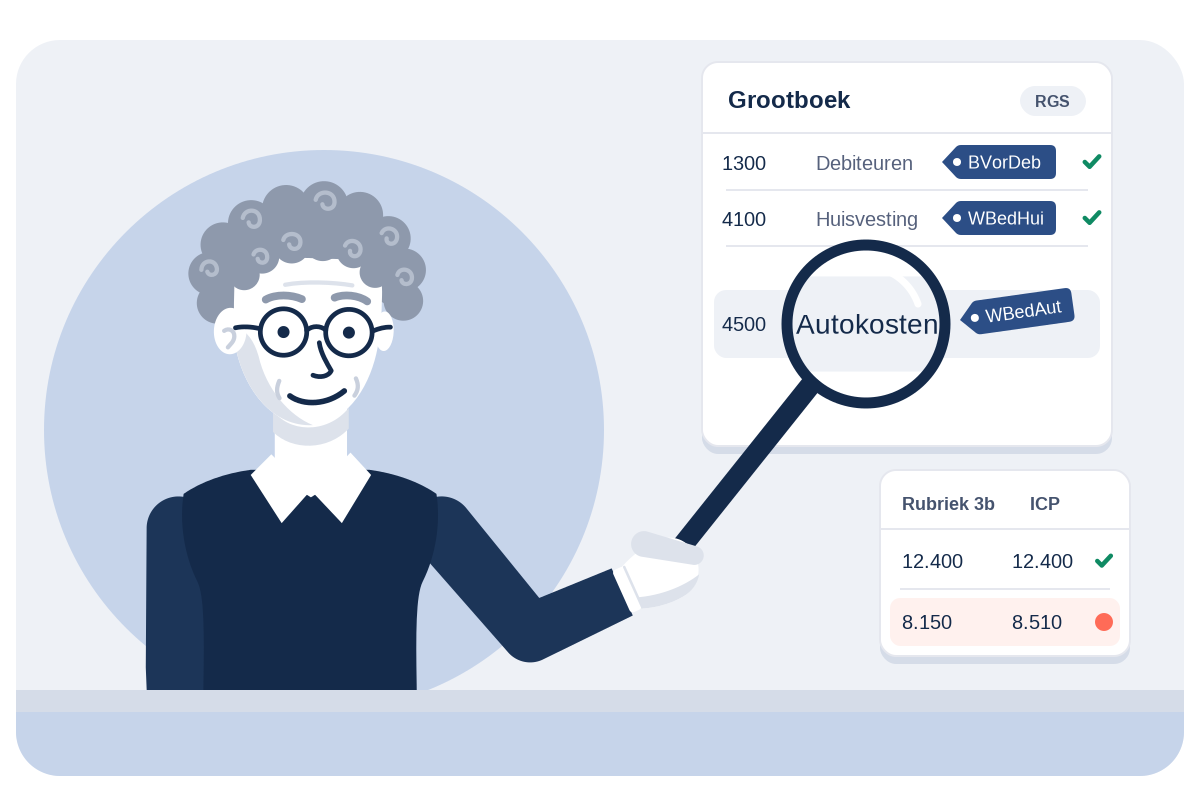
An account without an RGS code falls outside the classification in your RGS overviews; in boeq it shows under Not classified. An outdated or wrong code puts revenue or costs in the wrong place, in every period of that account. With a new client or an old chart of accounts there can be a lot of them, and nobody has time to go through them one by one. With Pieter, nobody at the firm has to check this by hand any more, not even for a new client.
Pieter checks all active general ledger accounts of a client administration. He first reads the codes fresh from Exact Online, looks for codes that are missing or no longer correct, and checks which code your firm gave the same account in your other client administrations. For each account he makes a proposal, showing how sure he is and what shifts in the reporting sections, VAT and revenue.
- A proposal per account, showing how sure he is
- He recognises codes your firm already chose elsewhere
- You see in advance what shifts in your figures
- Set in Exact Online after your approval, then read back
The ICP check
Revenue in box 3b, but no ICP return?
A forgotten ICP return only comes to light when someone goes looking. Pieter looks for you. For each closed period up to a year back, he checks box 3b against the ICP returns in Exact Online. He lists the periods with revenue in box 3b but no ICP return filed. Anything overdue gets the label Late. The sooner you find a missed return, the easier it is to put right: the documents are still to hand and your client still remembers what it was about.
For each period he asks one question: will you file a return, or tell him why one isn't needed? You file from Exact Online, or you mark the period as done, with a reason. During this check Pieter writes nothing to your client administration.
- All your client administrations in one go, or only the ones that need it
- Done stays done, until box 3b changes
- Pure calculation: nothing goes into Exact Online
Example from the product: for each period, Pieter compares box 3b of the VAT return with the ICP returns (the EC Sales List) and asks what you want to do about a period without one.
How Pieter works
You set him to work. He shows you what he found.
Pieter never starts on his own. You choose the client administrations, he does the job and then waits for your verdict.

-
01
Choose
Choose one client administration, a few, or all your firm's client administrations at once.
-
02
See the cost
Before he starts, you see what the check costs and how many credits you have left. If that's not enough, he doesn't start.
-
03
Check
Pieter reads the accounts fresh from Exact Online and checks them. You can watch him work live.
-
04
Review
Approve a proposal, reject it or choose a different code yourself. You can approve the proposals he's sure about in one go, across client administrations too.
-
05
Apply
Pieter sets approved codes in Exact Online and reads them back. Only then does a change count as done.
Knowledge base

How to work with Pieter, step by step.
The knowledge base explains how to start a check, review his proposals and mark an ICP period as done.
What you decide
Pieter proposes. You decide on every code.
Pieter has no permissions. No code changes until you approve it. A code you approve applies to that account in that client administration. If an account with the same number and name is added there later, your approval applies to it too; Pieter sets that code at the next check. In the ICP check, you choose what happens for each period.
Pieter's record shows how often you accepted his proposals unchanged. So the figures tell you how often you agree with him.
- Every RGS code: approve, reject or choose a different one
- Every ICP period: file in Exact Online or mark as done with a reason
Example from the product: Pieter proposes an RGS code (from the Dutch reference chart of accounts) for one general ledger account, shows how certain he is and what moves, and waits for your approval.
Limits
What Pieter never does.
These aren't settings. It's how the product is built, because you're liable for what's in the books.
Never
Change a code without you
No RGS code changes without approval from someone at your firm.
Never
Choose a code that isn't allowed
A code that is too general, a code for the other side of the account, a code that is no longer active or a code meant only for opening balances doesn't go in, because the RGS rules don't allow it. Not even if someone picks it by hand.
Never
File an ICP return
Pieter points out the period. You file the return yourself, in Exact Online.
And if someone is working in Exact Online in the meantime?
Then Pieter leaves that account alone. Just before writing, he checks what's in Exact Online. If the account has changed in the meantime, he writes nothing. After writing he reads the code back, and only then does it count as done.
- SoftwareExact Online
- PermissionsNone, you approve
- CostOn your credits
- Client portalNot shown there
Honest answers
Frequently asked questions about Pieter

-
For now Pieter does the RGS check and the ICP check, both in Exact Online. A job for Pieter never holds up Leo's work: he works on a track of his own. Read how to start a check in the knowledge base.
-
Pieter runs on your credits. You see what a check costs before he starts. A check that fails costs nothing, and approving proposals and having codes set in Exact Online costs nothing extra. In the demo we go through what a check of your own client administrations would cost.
-
Yes, and that's exactly the work that keeps getting pushed back: account by account, client administration by client administration. Pieter takes all your client administrations in one go, recognises the codes your firm already chose elsewhere and shows you what shifts for each account. All you have to do is review.
-
First he looks at hard signals: a missing, unknown, outdated or inactive code, or a code that doesn't fit the legal form. Then he looks at which code your firm gave the same account in your other client administrations, and what your team decided before in this client administration. Only then does he choose, and only from codes that are allowed on that account. He doesn't make up codes.
-
Yes, if you approve a new code: it applies to every period of that account, including in reports that have already been shared. That's why you see in advance what shifts, and why Pieter asks you to confirm.
-
She will. Once Sara is here, she'll look at it at every closing, around the VAT return she prepares, for that one period. Pieter already looks back in one go over all closed periods up to a year back, for all your client administrations. That's how you find what was left undone.
-
Leo's proposals build on what the RGS codes mean. If you ask Leo about a client administration in the chat, he can tell you what Pieter found. Sara is coming soon. If she later finds accounts with a balance but no code at a closing, she'll report them and you can have Pieter check them.
-
No, only with Exact Online.
-
No. Pieter only works for your firm and doesn't appear in the client portal or in client questions.
The team
Pieter doesn't work alone.
Pieter checks the codes that Leo's proposals build on. When Sara joins, she'll report accounts without a code at a closing and you can have Pieter check them. Someone at your firm decides on every code.


Demo
See it first, then decide.
In thirty minutes Nour walks you through what Pieter checks and what he puts to you, and you talk about which of your client administrations could use a check. If it's not a good fit, we'll say so.

You'll speak to Nour
Co-founder, partner at DKB Finance
Thirty minutes on your portfolio, in Exact Online.