Topics
Hide, deactivate or reactivate an administration
Hide an administration just for yourself, or deactivate it for your whole firm. This covers both, and how to switch it back on.
Screenshots show boeq's Dutch interface.
There are two ways to take an administration out of view.
| Hide | Deactivate | |
|---|---|---|
| For whom | Only you | Your whole firm |
| Work in the administration | Carries on. Leo keeps working in it. | Stops. boeq no longer fetches data from Exact Online. |
| Opening it | Still possible, but it isn't in the administration picker | Nobody can open it any more |
| Who can do it | Everyone | Anyone with the Manage administrations permission, by default the Administrator |
In both cases your data is kept.
Hide an administration
-
Go to Settings › Administrations.
-
Turn off the switch under In your overviews for the administration.
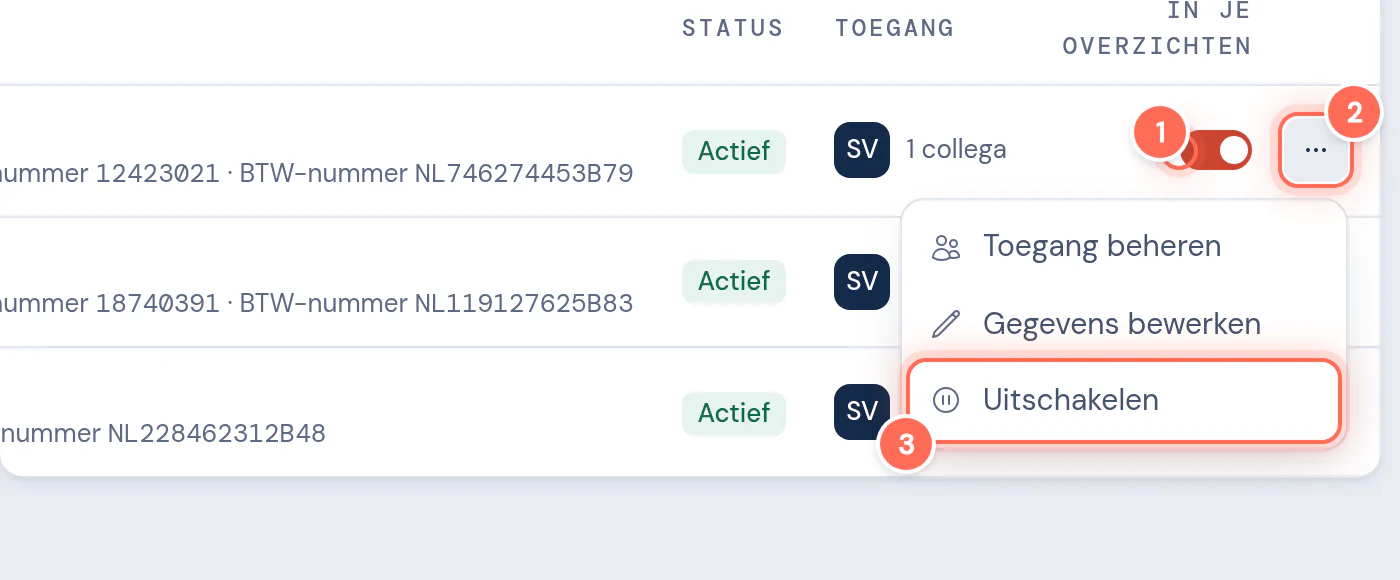
1 hides the administration for you. With 2 and 3 you deactivate it for everyone.
The administration no longer appears on your dashboard or in the administration picker. You also stop getting notifications about it. If everyone with access has hidden it, everyone gets the notifications anyway.
Want to see it again? Click Filter › In your overviews › Hidden. Then turn the switch back on.
Deactivate an administration
Do this for a client who is leaving, or for an administration your firm doesn't work in.
- Go to Settings › Administrations.
- Click ... at the end of the row.
- Click Deactivate.
The status becomes Disabled. Even if the administration stays in Exact Online, boeq doesn't switch it back on by itself.
Reactivate an administration
- Go to Settings › Administrations.
- Click ... at the end of the row.
- Click Activate.
boeq then fetches data from Exact Online again. If Exact Online no longer passes the administration on, it goes back to Inactive within an hour.
Good to know
Several administrations at once? Tick them. Hide and Show appear at the bottom. If you have the Manage administrations permission, you also see Activate and Deactivate.
Further reading
Still stuck? Email [email protected] or call +31 6 57867535.