Topics
Answer questions and pass them on to your client
Leo puts questions to your firm in Questions. Don't know the answer? Then pass the question on to your client's portal.
-
 Leo
- Updated
- 7 min read
- Role: Member or Administrator
On this page
Before you start
- Want to send a question to your client? Then your client needs a client portal.
Screenshots show boeq's Dutch interface.
An open question is a question from Leo about an invoice or bank transaction. You give the answer, or your client does in the portal.
Answer a question
-
Open Questions in the menu, under Leo.
-
Read the question.
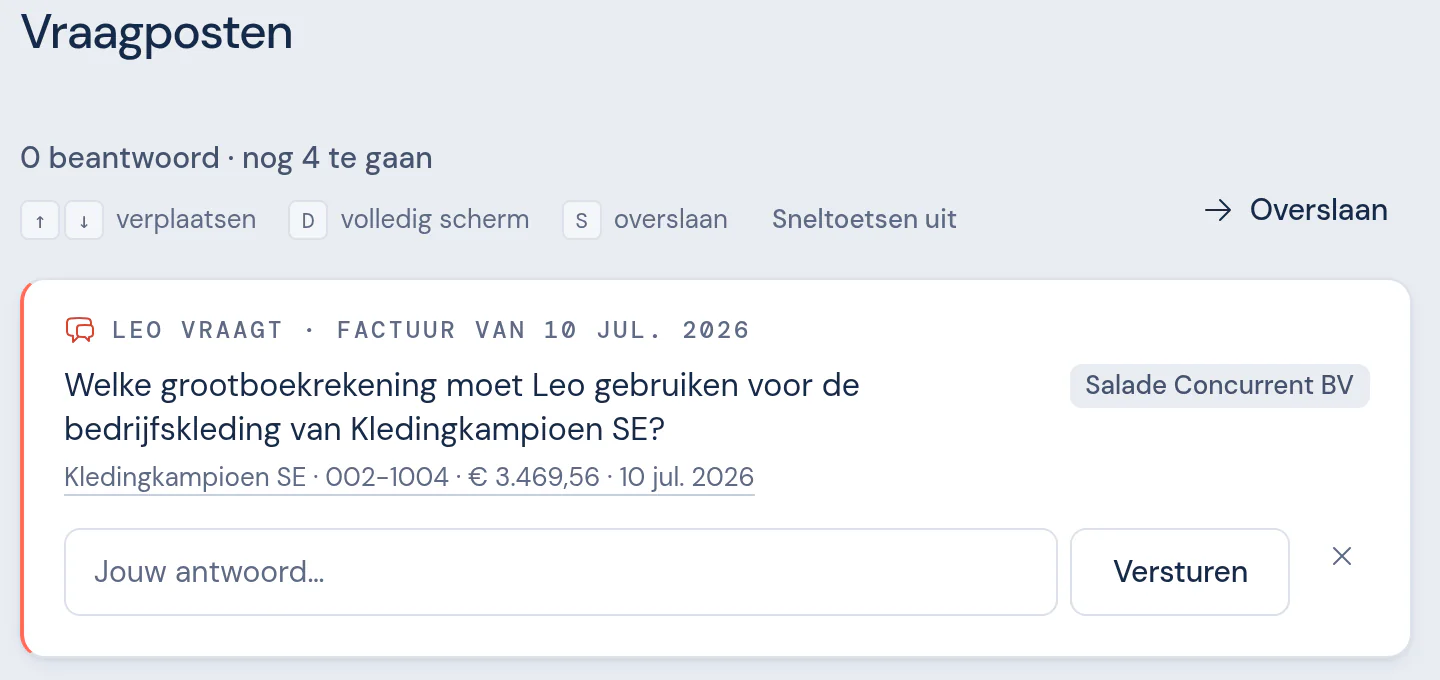
You see one question at a time. The next questions are under Up next. -
To see the invoice or transaction, click the line below the question. If the question is about an open invoice that is not in boeq, that line opens the document from Exact Online.
-
Choose or type your answer.
-
Click Submit.
Leo carries on with your answer. Then the next question appears.
What your client answered or sent in through the portal and still needs processing is in Client replies. Questions has a Client replies button at the top. Questions your client handed back and Leo's proposals to settle an open invoice are only there. They don't count towards the number next to Questions.
Pass a question on to your client
If your client has a portal, Leo puts some questions straight into the portal, without you seeing them first. For example a request for a receipt for a payment, or how an open invoice was paid. Your client finds them under To do.
You can ask something yourself in three ways:
- I don't know: this answer is offered for questions with fixed answers. For some questions, such as what a purchase is for, boeq then puts the question in the portal. In Questions, the question then has the status 'Waiting for client'.
- Ask the customer: open a debit under Bank transactions. Click the three dots and choose Ask the customer. Leo then asks your client for the receipt.
- Draft question: in the chat, Leo can draft a question to your client. Below his answer there is then a button that opens the draft in Questions. Read the text under Question to the customer and click Send to the customer or Don't send. Nothing goes to your client until you click.
Sara also asks your client questions for a closing. Read Send client questions and the document list.
What your client sees
Your client finds the questions under To do, in Questions from our office. They type an answer, choose one or upload a document.
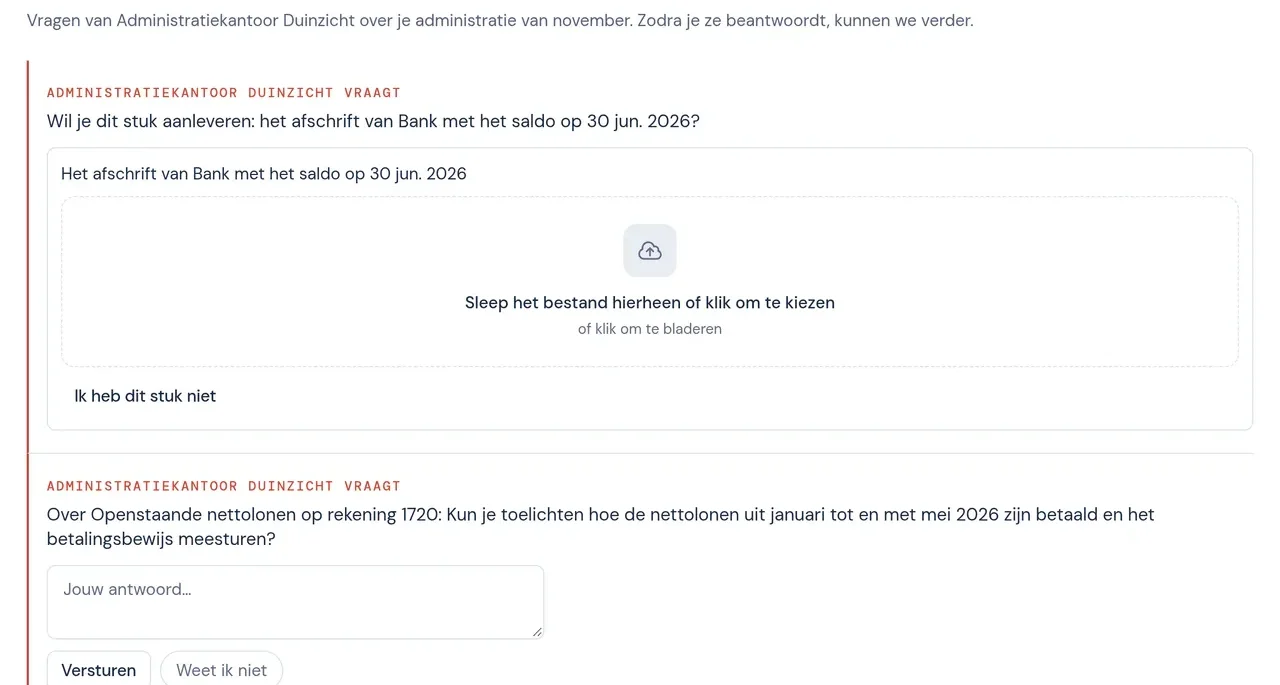
- Above the questions is the period they are about, for example 'Questions from … about your administration for March and April.' Those are the months of the invoices and payments in the questions, not the months in which the questions were asked. With more months it reads, for example, 'March to November'. If the period falls outside the current year, both months carry the year. If no question is about a dated invoice or payment, the sentence names no period. When your client clicks show all, every question counts.
- Questions of the same kind are listed together in a series, with the whole question on each row.
- Below a question about a payment, the bank's description only shows when it adds something to the counterparty and the invoice number.
- Is a question about an invoice? Then View document is below it. It opens the invoice in a new tab, also when the invoice is only in Exact Online. If the document can't be shown, your client reads: 'We cannot show this document right now. Contact us if you need it.'
The answer comes back in boeq at the transaction, invoice or closing the question was about. If your client doesn't know either, they click I don't know. The question is then in Client replies, marked 'Client does not know', and you answer it there yourself. Your client sees the question under We are looking into it.
Did you ask your client for the correct document for a rejected invoice? Then that question closes by itself as soon as an invoice from the same supplier for the same amount is booked in boeq. Read Check and book a booking proposal.
Questions about open purchase invoices
If your client has a portal, Leo asks them how an open purchase invoice was paid:
Invoice 2026-118 from Drukkerij Van Dam for €450.00 is still open and the payment is not on the business account. How was this invoice paid?
Leo only asks this when both are true:
- The invoice is more than 30 days past its due date. A credit card statement sometimes arrives weeks after the invoice. Leo never asks about an open item without a due date.
- Nobody can find the payment. No bank transaction is linked to the invoice. There is also no unlinked bank transaction from the same supplier for the open amount, and no bank transaction from that supplier for that amount booked straight to a cost account, such as a card payment on 4300. A small difference from card charges or a foreign currency counts as the same amount.
If that no longer holds for an open question, Leo withdraws it after the next sync. The question then disappears for your client and from Questions, without anyone answering it.
Your client chooses one of these answers, or I don't know:
| Answer | What happens |
|---|---|
| Paid privately | Leo proposes a general journal entry against a current account. You book it in Client replies. |
| Another account of … , such as a credit card | With the administration's name. Leo prepares no entry. |
| Paid from another BV | Leo proposes a general journal entry. In Client replies you choose the current account. |
| Not paid yet | Is the invoice still open after 14 days, with no payment linked to it? Then Leo asks the question again. That happens the first time he looks at the invoice after those 14 days, for example after the next sync. |
Other answers don't come back. Neither does a question your firm dismissed.
Report it under Open purchase invoices
Your client doesn't have to wait for the question. In the portal, under Reports › Open purchase invoices, every open purchase invoice has the Paid from another account button, also when the invoice is not overdue yet. A credit note doesn't have that button.
- Your client clicks Paid from another account. Below the invoice, the question Which account was invoice … paid from? appears.
- They choose Privately, Another account of … , such as a credit card, the name of a connected entity, or Other. With Other, they write under Where was it paid from? where the invoice was paid from.
- They click Record.
The connected entities are the other administrations in the portal and the entities the administration has a current account with. The administration's own trade names are not offered.
After recording, the invoice shows what your client reported, with the date. For example 'Paid privately, reported on 18 Nov 2026' or 'Paid by Holding Noord B.V., reported on 18 Nov 2026'.
- Privately works like Paid privately on the question, and a connected entity like Paid from another BV. Leo proposes a general journal entry in Client replies.
- Another account of … gives no proposal.
- With Other, Leo books nothing. You read your client's explanation under All questions, on the History tab.
Questions from the portal
In the portal chat, your client can forward a question to your firm. You then get a notification 'Question from the portal of' with the name of the administration. In Questions, the question is under Questions from the portal.
- Type your answer under Reply to the customer.
- Click Send reply.
Your client sees your answer in the chat, with your name. When there is nothing left to do, click Close.
What Leo does
Leo asks questions about invoices and bank transactions. Does your client have a portal? Then he puts some of those questions to your client himself.
What you decide
You answer the questions to your firm, choose which questions to pass on, and send a draft question from the chat from Questions.
Further reading
Still stuck? Email [email protected] or call +31 6 57867535.