Topics
Check and book a booking proposal
Leo prepares a booking for every invoice. This is how you check his proposal and book it to Exact Online.
-
 Leo
- Updated
- 5 min read
- Role: Member or Administrator
Before you start
- Exact Online is connected.
- There are invoices in the administration.
Screenshots show boeq's Dutch interface.
Open an invoice
-
Choose the administration at the top.
-
Open Invoices in the menu.
-
Choose the Leo needs you view. This is where you find the invoices waiting for you.
-
Click an invoice. The proposal opens on the right, with the document next to it.
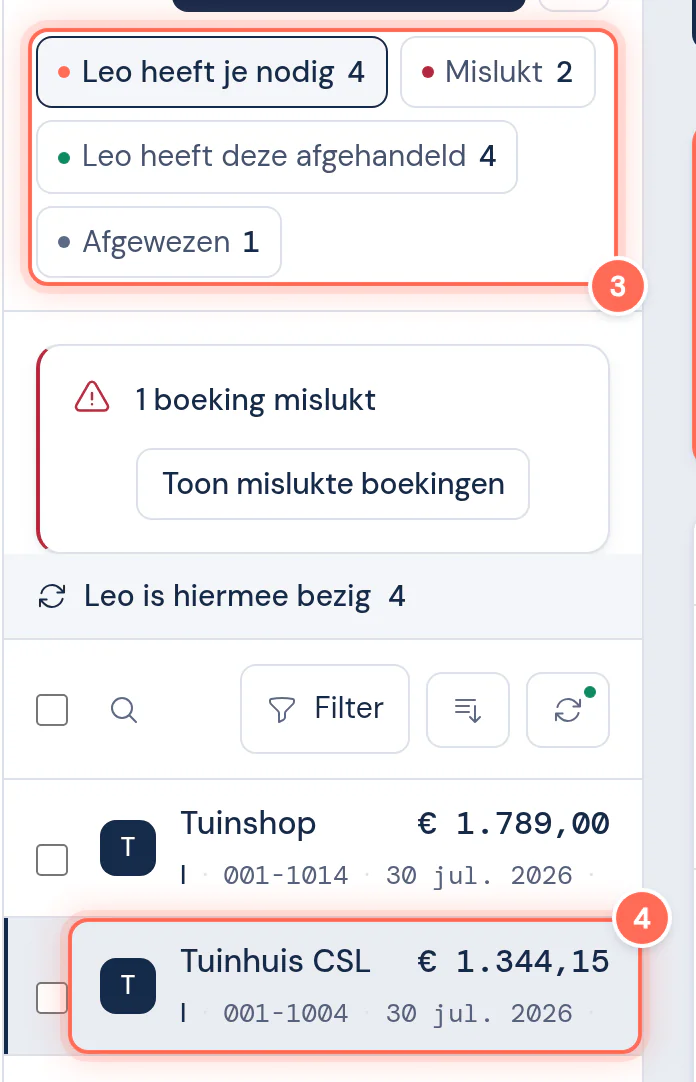
Choose a view and click an invoice.
| View | What it contains |
|---|---|
| Leo needs you | Invoices with the status 'Leo has a question' or 'Reverted' |
| Failed | Invoices Leo couldn't read, recognise or book |
| Leo handled these | Booked invoices, and the invoices Leo is still processing |
| Rejected | Invoices that won't be booked |
At the top of the list, Leo is working on these shows how many invoices Leo is still processing.
Looking for an invoice? Above the list, type part of the file name, the invoice number or the supplier's or customer's name in Search…. boeq searches the view that is open. If an invoice has no proposal yet, boeq searches the name Leo read off the document.
Check the proposal
-
Read the Leo needs your input block. It says why the invoice is waiting for you.
-
In the Booking proposal, read the What Leo still needs from you block. A red item stops you from booking. Sort that out first.
-
Compare the Supplier, the Invoice number, the Invoice date and the Total amount with the document.
-
Under Booking lines, check the general ledger account and the VAT code.
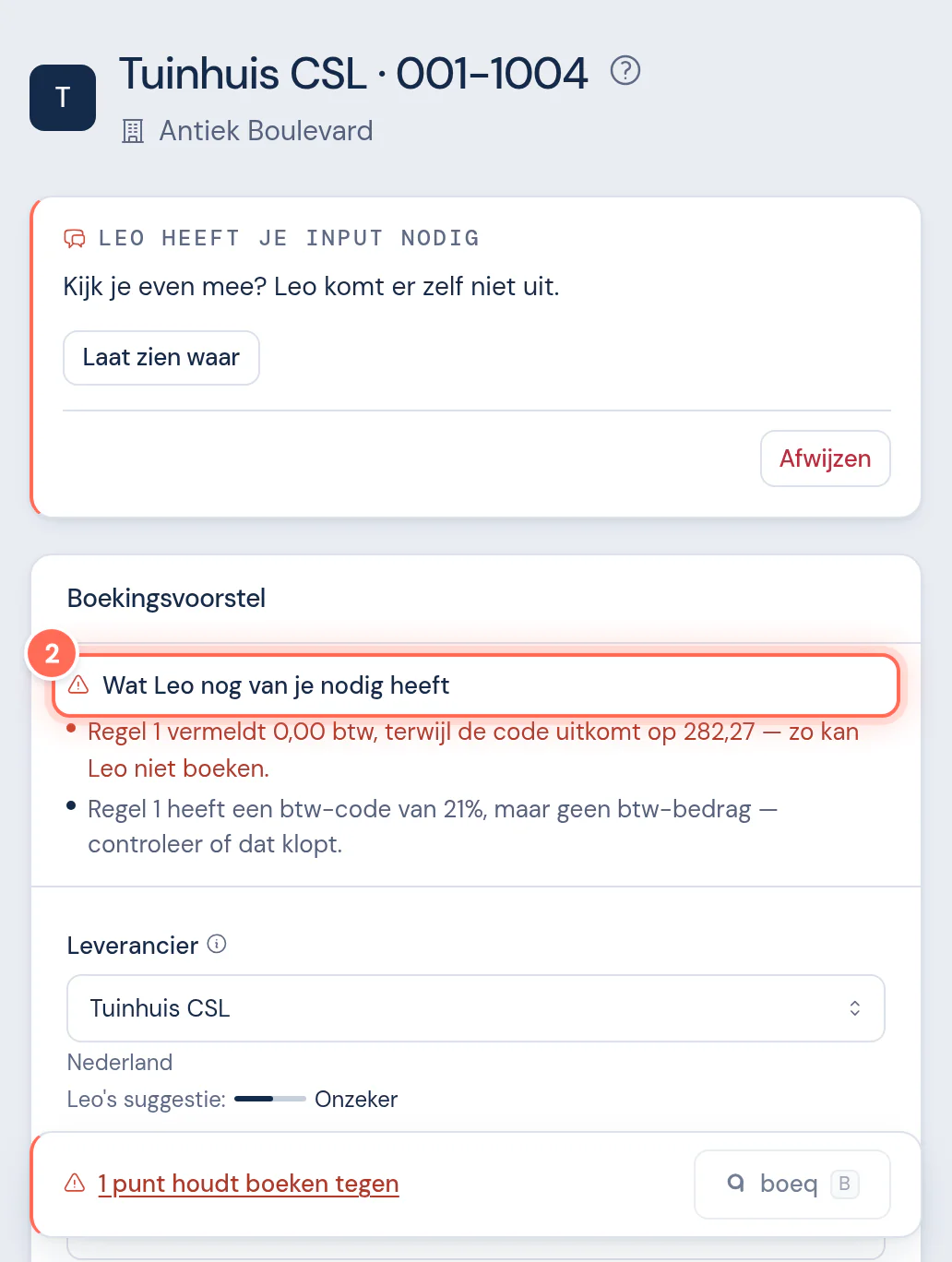
As long as there is a red item, you can't book yet.
Does Leo is still working appear instead of the proposal, with 'Leo is checking this invoice again'? Then Leo is checking the invoice again, for example because a working agreement for this supplier was just added. You can book once he has finished. The new proposal appears by itself.
Is a field wrong? Read Correct a proposal and make Leo remember it.
Book to Exact Online
- Click boeq at the bottom. You can also press B.
- Read the question that appears. It shows the amount and the supplier.
- Click boeq again.
Leo books the invoice in Exact Online. The top of the invoice then says Booked in Exact, with the entry number. After that the invoice is in the Leo handled these view.
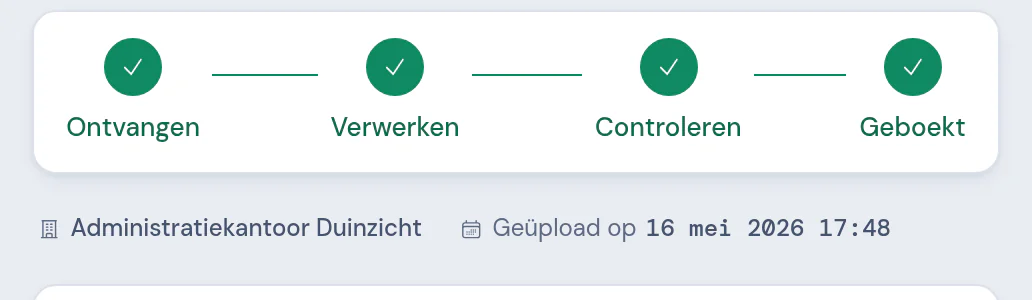
Did a bank line already show this invoice as Open item found? Then Leo links that payment to the invoice right away and completes the bank line. He only does this when the invoice was the only open item the bank line found, and when only that one bank line found the invoice.
Is the button grey? Then an item is still stopping the booking. Click 1 issue blocks booking next to the button. You jump straight to that item.
Does your firm ask for a reason for changes? Then the Reason for change field sits above the button. If you replaced a value from Leo, he only books once you fill in a reason. Read Correct a proposal and make Leo remember it.
Reject an invoice
If the invoice doesn't belong in this administration, or isn't an invoice at all, reject it.
- Click Reject.
- Under Why are you rejecting this invoice?, write briefly why. You can skip this.
- Does your client have a portal and do you want the correct document? Tick Ask the customer for a new document. Under Note for the customer (optional), write what your client reads word for word.
- Click Yes, reject.
The invoice is then in the Rejected view, and the next invoice in the list opens.
Watch out
If an invoice was booked wrongly, an Administrator can revert the booking. This permanently deletes the booking from Exact Online. Read Undo a booking.
When your client sends the correct document
Did you ask your client for a new document? Or did you answer a question from Leo saying a document is not an invoice? Then Leo asks your client for the correct document in the portal. For a document that is not an invoice, the question reads, for example:
The document from Drukkerij Van Dam for €450.00, dated 3 Nov 2026, is not an invoice. Can you provide the invoice itself?
That question closes by itself as soon as an invoice from the same supplier for the same amount is booked in boeq. An invoice that was booked earlier closes it too: Leo checks that every day. The Activity tab of the booked invoice then says Replaces a rejected document of the same supplier.
Was the invoice booked straight in Exact Online, outside boeq? Then the question stays open. Dismiss it yourself in Questions.
An invoice addressed to someone else
Is an invoice addressed to a different company or person than the administration? Then Leo puts it to you. If it does belong in this administration, click Process anyway. Leo then also accepts later invoices addressed to that name.
Did you reject or delete the previous two invoices from the same supplier addressed to that name? Then Leo rejects the next one himself. The Activity tab says why.
- If you booked one of those two, or ticked Ask the customer for a new document when you rejected it, Leo puts the invoice to you.
- Another name or another supplier counts separately.
- Disagree with such a rejection? Open the invoice in Rejected and click Reopen and process again. Leo then puts it to you and does not reject it again.
What Leo does
Leo reads the invoice, finds the relation and prepares the booking with a general ledger account and a VAT code. If he has doubts, he writes down why.
What you decide
You check the proposal, change what is wrong and book. Leo books nothing without your click, unless your firm gives him the authorisation.
Not working?
Further reading
Still stuck? Email [email protected] or call +31 6 57867535.