Topics
Bank transactions: the views explained
The Bank transactions screen shows what is waiting for you, what Leo has done and what your firm booked. How to read the views and statuses.
-
 Leo
- Updated
- 5 min read
On this page
Screenshots show boeq's Dutch interface.
Open Bank transactions in the menu, under Leo.
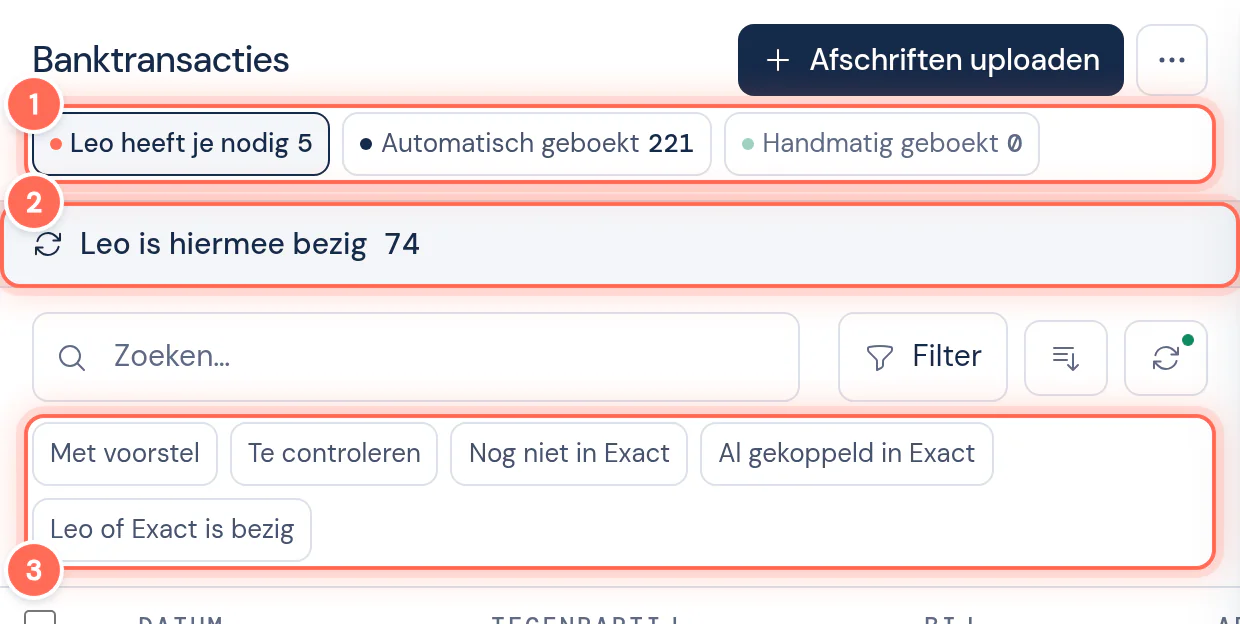
The three views
| View | What it contains |
|---|---|
| Leo needs you | Lines waiting for you. Also lines that have been handled but aren't in Exact Online yet, and the rest of a payment that Exact Online matched only in part. |
| Auto-booked | Lines Leo booked himself, or that were already booked directly in Exact Online. |
| Manually booked | Lines that you, a colleague or your client handled, and that are in Exact Online. |
The number next to a view is the number of lines in it. Start your day with Leo needs you.
The bars above the list
- Leo is working on these: lines Leo is still processing. You don't need to do anything with them.
- Waiting on your client: payments your client was asked a question about in the client portal. You only see this bar for an administration with an active client portal. Click it to see the lines.
- 1 import needs you (or 2 imports need you): an uploaded statement needs you. It is ready to post, waits for a journal or a rate date, or it failed. Click the bar. Is one statement waiting? Then it opens straight away. Are more waiting? Then you see the Statement files list, with these statements at the top. Read Upload bank statements.
Filter quickly
In Leo needs you you filter with one click:
| Filter | Which lines |
|---|---|
| With proposal | Leo has a booking ready and is waiting for your approval. |
| To review | Leo couldn't handle the line himself. |
| Not in Exact yet | The line has been handled, but isn't in Exact Online yet. |
| Already linked in Exact | Exact Online has already processed this statement. You book the line there yourself. |
| Leo or Exact is on it | Leo or Exact Online is still working on the line. |
With proposal shows the lines with the status 'Awaiting your approval'. To review shows 'Needs review'.
Looking for something else? Use the search field or Filter. Under Filter you can choose the status, the direction (Money in or Money out) and the amount, among other things. If the administration has more than one bank journal, you choose the journal above the list.
A partly matched payment
Did Exact Online match a payment to an invoice for only part of its amount? Then Exact keeps the whole line on its To be completed list until the rest is matched too. boeq counts that rest in Leo needs you, under To review.
- The amount is the rest. A payment of €1,078.00 with €670.00 matched shows as €408.00.
- Below the amount it says Remainder of €1,078.00.
- Under Filter › Source it is an Outstanding payable, or an Outstanding receivable for money received.
The payment counts once. The bank line itself is handled in boeq; only the rest is open. This way the number in Leo needs you matches the number of lines on To be completed in Exact Online. Comparing the two lists? Exact shows the line at its full amount and boeq shows the rest, with the same entry number and date.
Like Exact, boeq counts no rest for a payment booked on account in Exact without a link to an invoice. A payment on a statement that Exact has already processed doesn't count either.
The counterparty
Every line shows the counterparty: the name the bank passes on. A credit card line often has no name. boeq then reads the merchant from the description. That way ANTHROPIC* CLAUDE TEAM ANTHROPIC.COM US gets the counterparty ANTHROPIC, and OPENROUTER, INC OPENROUTER.AI US gets OPENROUTER, INC.
Does the bank give no name at all? Then boeq shows the relation the line is linked to. If there is none, it shows the merchant Leo recognised, and otherwise the supplier's brand. Only when boeq knows none of these names does it say Unknown counterparty. The same name shows next to the payment on the invoice's Payment tab.
The status of a line
| Status | What it means |
|---|---|
| Being processed | Leo is working out how to book the line. |
| Booking | Leo is putting the line into Exact Online right now. |
| Document expected | Leo is still waiting for an invoice or receipt for this payment. |
| Open item found | Leo found an open item that fits the payment. Confirm the match under Invoice matching. A proposal marked Uncertain doesn't give this status. |
| Waiting for Leo | Leo hasn't picked up the line yet. |
| Completed | Nothing more needs to happen. |
| Failed | Leo couldn't process the line. You can still book it yourself. |
If lots of lines are waiting for you, click the three dots at the top right and choose Quick booking.
Good to know
In Quick booking, Leo lines up the transactions one at a time, his most certain proposals first. Read Quick booking at the bank.
How to handle a line is explained in Reconcile or book a bank transaction.
What Leo does
Leo fetches the bank transactions from Exact Online and looks for an invoice or a general ledger account for each one. Whatever he isn't sure about, he puts in Leo needs you.
What you decide
You handle the lines in Leo needs you. Leo only books on his own if your firm gives him that authorisation.
Further reading
Still stuck? Email [email protected] or call +31 6 57867535.