Topics
Leo's authorisations: booking on his own and thresholds
Decide whether Leo may handle invoices and bank transactions on his own, and how certain he must be. By default everything is off.
- Level: Advanced
-
 Leo
- Updated
- 2 min read
- Role: Administrator
Before you start
- You have the Administrator role, or a role with the Manage working agreements permission.
Screenshots show boeq's Dutch interface.
An authorisation is something Leo may do without your approval. Is an authorisation off? Then Leo prepares the work and puts it to you. By default, all three are off.
The three authorisations
| Authorisation | What Leo then does |
|---|---|
| Book invoices on his own | Leo books an invoice on his own when he is more certain than the Invoice threshold (%). Is he unsure, or is a question still open? Then he puts the booking to you, whatever threshold you choose. |
| Settle bank transactions on his own | Leo settles a bank transaction on his own when he is more certain than the Bank threshold (%). For some types of suggestion, he only does so once he has agreed with you in that administration for a while. Until then, the transaction waits for you. |
| Post bank transactions to the ledger | Leo also books in Exact Online the bank transactions he settled on his own. Without this authorisation, they wait in Leo needs you. |
The threshold is a percentage between 50 and 100. The default is 90. The higher the threshold, the less Leo does on his own. A threshold below 70 changes nothing: Leo always puts a suggestion to you when his certainty is below 70. What you approve, Leo always books in Exact Online.
Switch on an authorisation
-
Open Dossier in the menu, under Leo.
-
Go to the Authorisations block.
-
Under Applies to, choose The whole office or One administration. If you choose one administration, also choose which one.
-
Switch on the authorisation's toggle.
-
Your browser asks whether you want to continue. Click OK.
-
Fill in the threshold and press Enter.
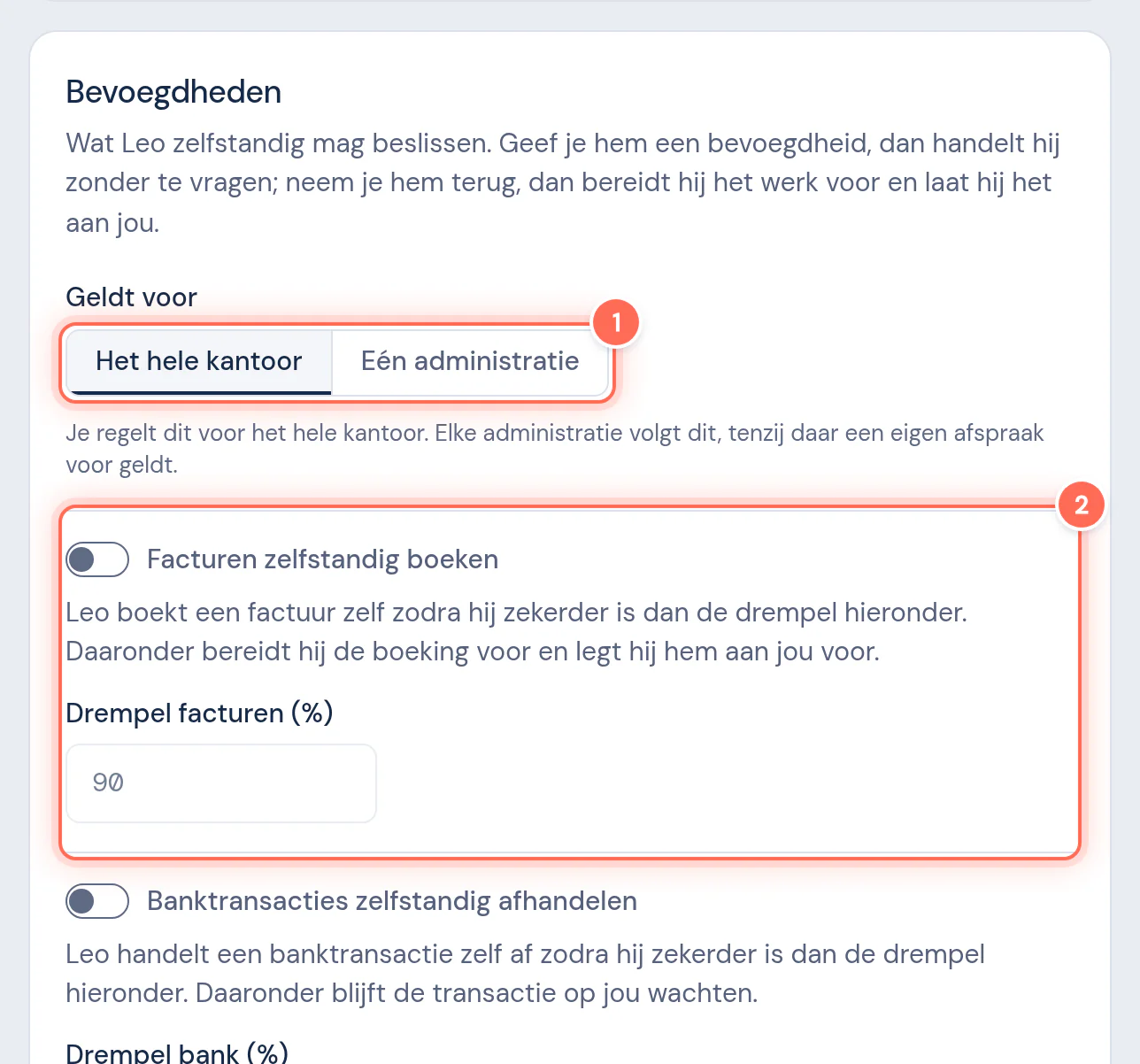
Choose who it applies to (1). Then switch on the authorisation and choose the threshold (2).
Switching off asks for no confirmation. Leo then goes straight back to preparing the work.
Per administration
Each administration follows what you choose for the whole firm. Do you set something for one administration? Then it says Arranged for this administration there. Follow the office again sets it back. For each authorisation you see who last changed it, and when.
Watch out
With Book invoices on his own switched on, Leo books an invoice without anyone seeing it first. Start with one administration and a high threshold. After a few weeks, check in Leo's record how it is going.
Some invoices always come to you, however certain Leo is. For example, a first invoice from a new country. You set that in Leo's way of working.
What Leo does
With an authorisation, Leo handles the work on his own when he is more certain than the threshold. Below it, he prepares the work and puts it to you.
What you decide
You choose which authorisations Leo gets, for which administrations and at which threshold. You can always switch them off again.
Further reading
Still stuck? Email [email protected] or call +31 6 57867535.