Topics
Reconcile or book a bank transaction
How to handle a bank transaction: match the payment to the right invoice, or book it to a general ledger account.
-
 Leo
- Updated
- 9 min read
- Role: Member or Administrator
On this page
Before you start
- You are in Bank transactions, in the Leo needs you view.
Screenshots show boeq's Dutch interface.
Match a payment to the invoice it paid. Is there no invoice for it? Then book the line to a general ledger account.
Open a line
-
Open Bank transactions and choose Leo needs you.
-
Click a line. It opens on the right.
-
Read what Leo found at the top.
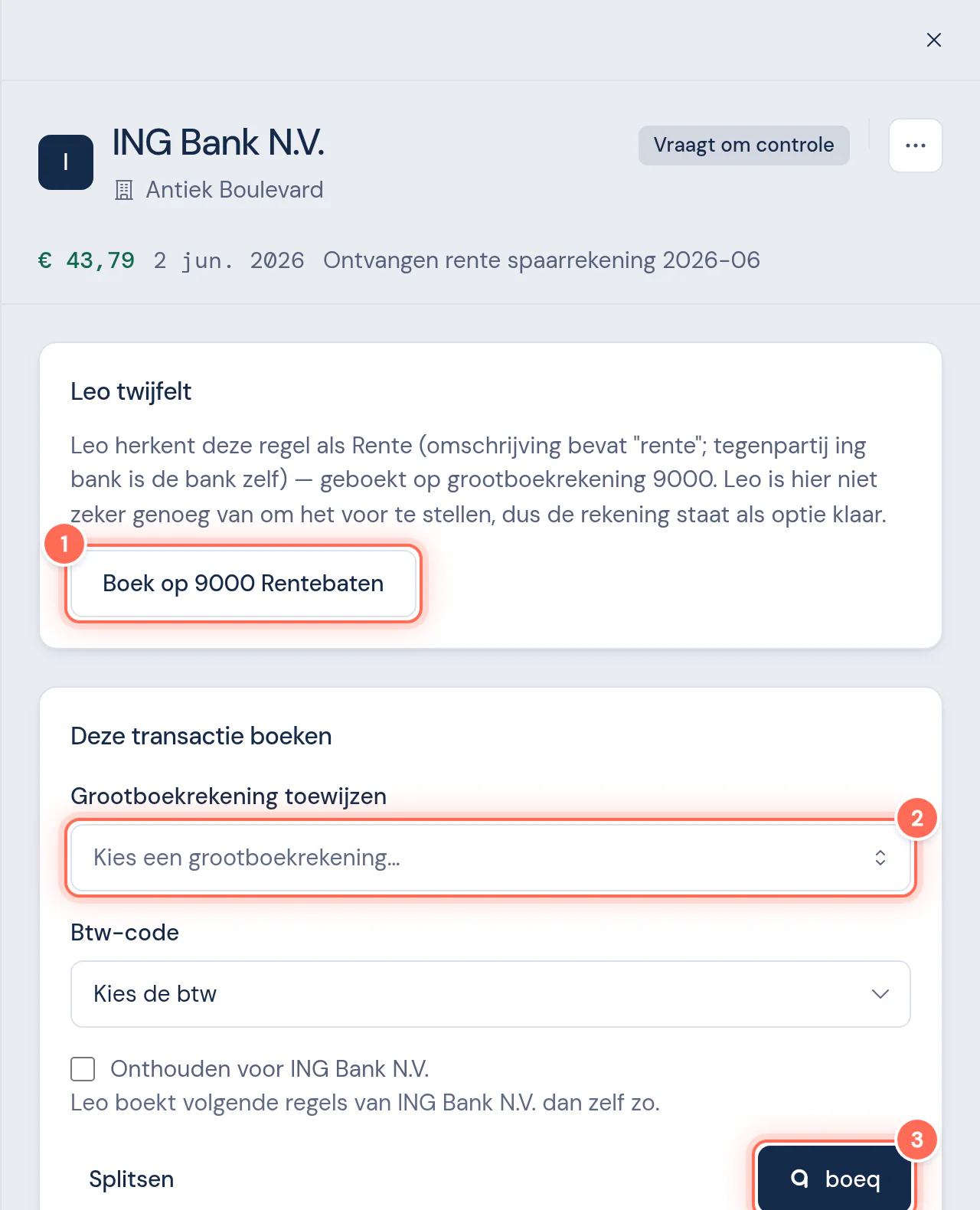
If Leo's account is right, click the button (1). Otherwise choose an account yourself (2) and book (3).
At the top is the header of the line: the counterparty, the status, the three dots and a line with the amount, the date and the description. On a tablet or a larger screen, the header stays in place while you scroll down. That way you always see which payment you have open while you book or match it. On a phone, the header scrolls with the page.
Leo shows one of these blocks:
- Leo's suggestion: Leo knows the account. Is it right? Click Approve and book in Exact. Is it wrong? Click Reject, then choose an account yourself under Assign ledger account.
- Leo is not sure: Leo offers one or more accounts as buttons, such as Book on 9000 Interest income. Click the right button.
- Leo found open items for this payment: confirm the invoice under Invoice matching.
- Leo couldn't find a ledger account: choose an account yourself.
- Not in Exact yet: Leo already settled the line, but in this administration he may not book it in Exact himself. Click boeq to book the line in Exact. Want Leo to do this himself from now on? Give him the Post bank transactions to the ledger authorisation. Read Leo's authorisations.
- Remainder of a bank line: Exact Online matched this payment only in part. You see the amount of the Bank line, what is already Matched and what is Still open. View the original bank line opens the whole payment. The line leaves Leo needs you once the rest is matched in Exact Online. Read Bank transactions: the views explained.
Want to know how Leo reached his choice? Look under Activity. After Leo: it says which step decided the line, for example a bank rule, earlier bookings of the counterparty, an open item or Leo's own classification with how sure he was. Then it says whether Leo booked the line, proposed it or put it to you, and why. Lines Leo processed earlier keep the rows they already had.
Book to a general ledger account
- Under Assign ledger account, choose the account.
- Choose the VAT code.
- Do you want Leo to suggest this account for this counterparty from now on? Tick Remember for the counterparty.
- Click boeq. Leo books the line in Exact Online.
Does the payment belong to more than one account? Click Split first.
You only see Remember for with the Administrator role or the Manage working agreements permission. It becomes a bank rule on the Bank tab. Leo only uses such a rule to book on his own once he has the Settle bank transactions on his own authorisation. Read Leo's authorisations.
Match with an invoice
-
Go to the Invoice matching block.
-
Is there an invoice under Proposals? Click View to check it.
-
Is it right? Click Accept and book in Exact. For a partial payment, the button says Accept.
-
Is the invoice not listed? Search for it under Add open item by number, relation or amount.
-
Fill in the Amount if needed and click Allocate.
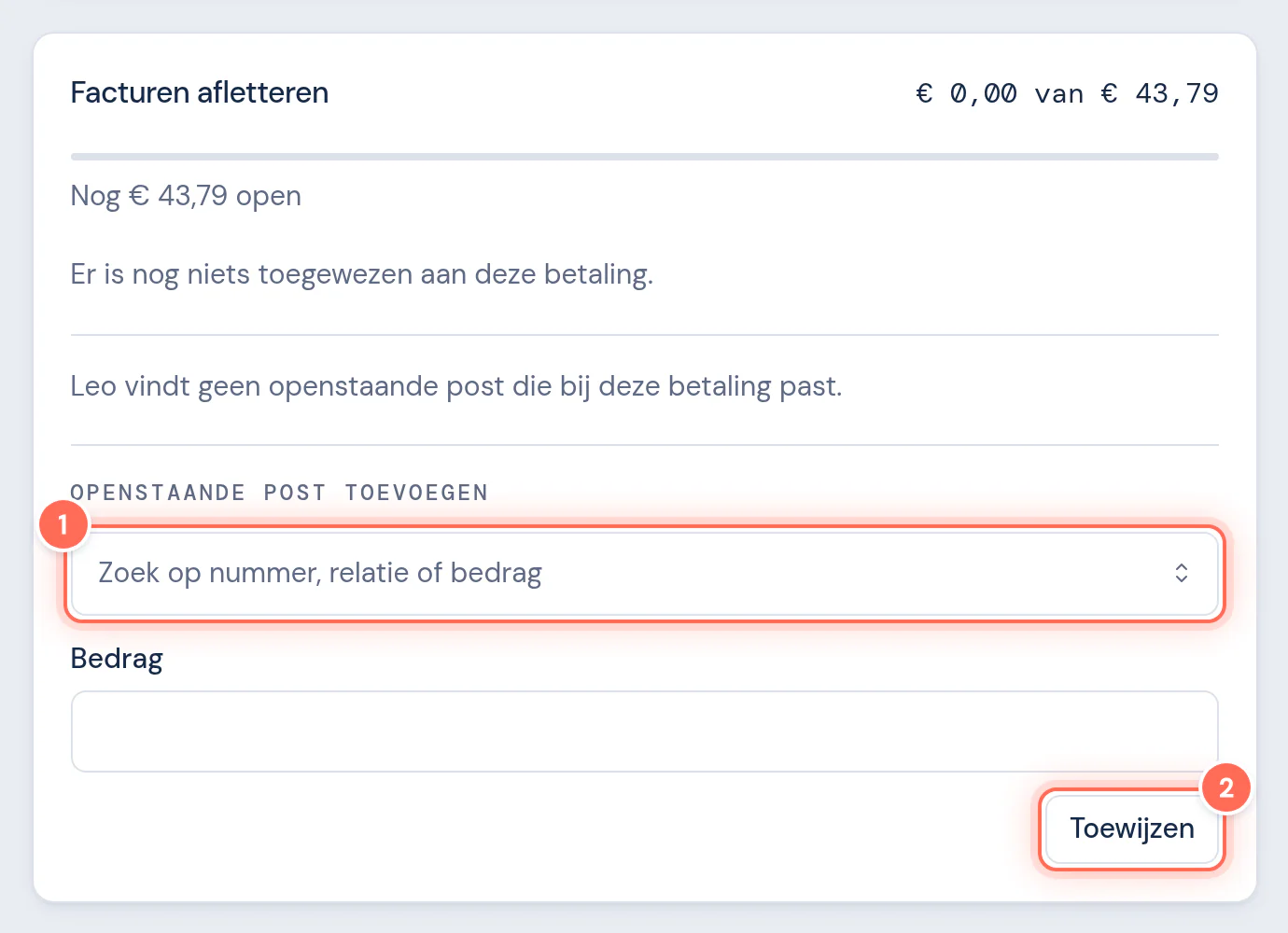
Search for the open item (1) and click Allocate (2).
View is on every proposal, including an open item from Exact Online, and next to Unlink on an item that is already allocated. The document opens inside boeq. You see a boeq invoice in the Document block. Any other open item opens in a window that fetches the document from Exact Online. If Exact Online has no document, the window says so.
Does the payment belong to an invoice booked outside boeq? Then boeq has no document for it. Under Document you only see the invoice number.
Does it say Document expected? Then Leo is still waiting for an invoice or receipt. Is it an expense, and does the administration have a client portal? Then Leo asks your client for the receipt himself and checks again every morning at 06:30. Don't want to wait? Click the three dots and choose Ask the customer.
Do you allocate an invoice yourself that this payment pays in full? Then the line no longer waits for a document. The client portal then also no longer asks your client for a receipt for this payment.
Did a bank line show an invoice as Open item found, and do you then book that invoice? Then Leo links the payment to the invoice right away and completes the line. He only does this when it was the only open item the line found, and only that one line found the invoice.
You can also use the keyboard. Press J for the next line and K for the previous one. Press A to approve Leo's suggestion.
How certain Leo is
Every proposal shows Certainty, with Certain or Uncertain. Are two proposals for the same line equally certain? Then both say Tied with another proposal, with the bar in the colour of an uncertain proposal.
A proposal marked Uncertain is a suggestion. It doesn't give the line the status Open item found. Leo judges the line further like a line without proposals: if he expects a document, he asks your client for it. The proposal stays, and you can still accept it. Is the invoice number on the bank line? Then an uncertain proposal does count as found.
Do several open invoices of the same relation fit equally well, with the same amount and the same evidence? Then Leo links the oldest one. That link carries the signal Oldest of equal. Under Activity it says, for example:
Leo linked €30.00 of this line to …, the oldest of several open items with the same amount and the same evidence.
Book a difference
Do you allocate an invoice yourself with Add open item, and is that invoice then paid in full? Then Leo books a small remainder of the payment as a difference himself:
- an Exchange-rate difference when the invoice is in another currency and the remainder is within the Exchange rate band (%);
- Rounding when the currency is the same and the remainder is within the Rounding tolerance (cents).
The line is then complete. Under Activity it says 'Leo booked the remaining [amount] as [reason] on [account].' Is the remainder larger, or is no account set for that kind of difference? Then Leo books nothing and the remainder stays for you.
Is a difference left open, such as bank charges or rounding? Click Book difference. Choose a reason and an account. Then click Book difference. An Administrator chooses the accounts and the limits in Bank settings.
After booking
The line disappears from Leo needs you as soon as it is in Exact Online.
Is a booking wrong? Read Change or undo a bank booking.
The invoice is not in Exact yet
Do you match a payment to an invoice that is not in Exact Online yet, for example because Leo is still booking it? Then the line shows Waiting for invoice booking. At the top of the line you read what happens once the invoice is in Exact Online:
- Leo books this line once invoice … is in Exact: Leo then books the payment against the invoice by himself. There is nothing for you to do. You see this when someone already asked to book the line, for example with Book right after, or when Leo has the Post bank transactions to the ledger authorisation in this administration.
- Book this line once invoice … is in Exact?: Leo only books the line when you ask. Click Book right after. Leo then books the line as soon as the invoice is in Exact Online.
Open invoice opens the invoice.
Is the relation of the invoice not in Exact Online yet? It gets there when the invoice is booked. While the line waits for the invoice, Leo therefore does not warn that the line has no relation.
Leo replaces the entry
Exact Online cannot change one line of a bank statement entry on its own. To book a line, Leo therefore replaces the whole entry. That undoes the matches of the other lines on the entry. Leo then puts those matches back in Exact Online, including the match of an invoice that was only paid in part. In boeq, those other lines stay settled.
Does Leo have to replace the entry, and are other lines on it matched? Then you see above the booking which matches he puts back, until the line is in Exact Online. For example:
Leo replaces entry 26210519 and then puts back the matches of Bakkerij De Duin (€457.38), Drukkerij Van Dam (€178.47) and 1 other line.
Leo names up to three lines and counts the rest.
Leo cannot book this line in Exact
When Leo cannot book a line in Exact Online, the top of the line says Leo cannot book this line in Exact, with the reason and what to do. For an entry with matches, these are the cases:
- The line itself is already matched in Exact Online. Leo leaves the entry alone. Book or change the line in Exact Online.
- Leo cannot put back a match on another line. This applies to a match that holds a general journal entry, such as a payment difference written off in Exact Online, or a general journal entry someone made by hand. Leo only finds this out when he tries to book the line. He then leaves the entry alone and names the matched lines. Book the line in Exact Online.
Is the payment on a different relation in Exact Online than the invoice? Then Leo has to replace the entry to book the match. If that fails for one of the reasons above, the message also names both relations with their codes, for example:
The entry has to be replaced because in Exact the payment is on relation Drukkerij Van Dam (40112) and the invoice on Drukkerij Van Dam (40113). If both are the same party, merge the two relations in Exact.
Are they two relations for the same party? Then merge them in Exact Online.
Do you see Leo could not put a match back? Then Leo replaced the entry, but Exact Online then refused to put one match back. The other matches are back in place. The message names the entry and the document. Match that document again in Exact Online.
What Leo does
For each payment, Leo looks for the open invoice or a general ledger account. He sets out his choice and explains why.
What you decide
You confirm the invoice or choose the account. Only then does Leo book the line in Exact Online. Without an authorisation, he books nothing on his own.
Further reading
Still stuck? Email [email protected] or call +31 6 57867535.