Topics
Why Leo chose something: certainty and source
With each choice, Leo shows how sure he is and where a value comes from. This is how you read that, and how you use it when you check.
-
 Leo
- Updated
- 2 min read
Screenshots show boeq's Dutch interface.
Leo explains why he chose a value. You see two things: how sure he is, and where the value comes from.
How sure Leo is
Some fields have a small bar with a word after it.
- Certain with a green bar: Leo stands by this choice.
- Uncertain with a dark blue bar: Leo has doubts. Check this field extra carefully.
For example, the supplier shows Leo's suggestion: Uncertain when Leo isn't sure which relation it is. In the Invoices list you can use Filter › Confidence to select invoices by how sure Leo is.
Why Leo chose this
-
Open an invoice.
-
Expand a booking line with the arrow at the end of the line.
-
Under Ledger account or VAT code, point at Details. Or click it.
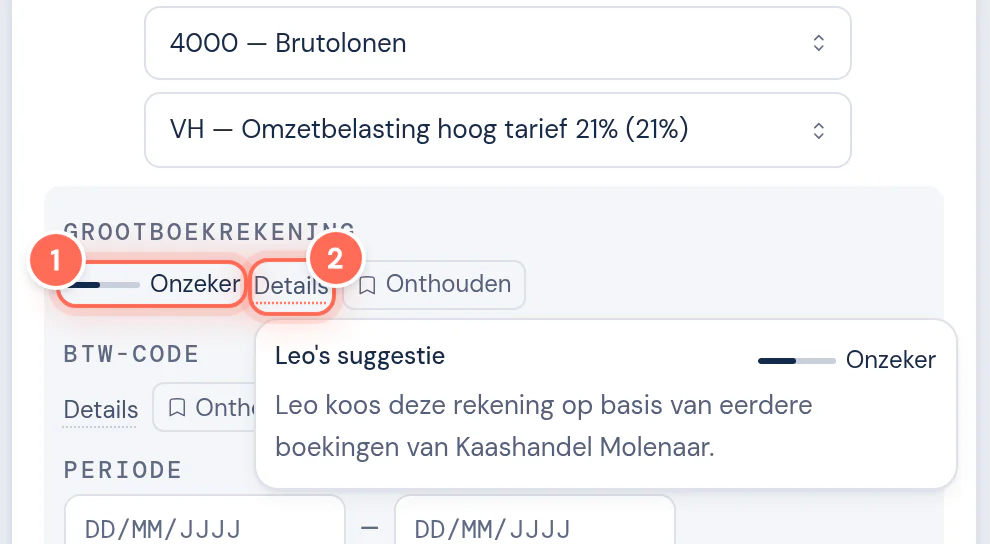
Behind Details, one sentence says why Leo chose this account.
The Leo's suggestion window says in one sentence why Leo chose this value. For example, that Leo chose the account based on earlier bookings for that supplier. For the supplier and the payment term, the same explanation is behind the i icon.
Where the value comes from
Some fields have a label below them that shows the source.
| Label | What it means |
|---|---|
| From the document | Leo read the value from the invoice. |
| From the history | Leo took the value from earlier bookings. |
| Based on your working agreement | A working agreement of your firm set the value. |
| Changed by you | Someone at your firm chose this value. |
| Relation default | The default value for the supplier or customer in Exact Online. |
| Administration default | The default value of the administration. |
| From an earlier decision | Leo reused an earlier choice made by your firm. |
| By rule | A fixed rule in boeq set the value. |
| Decided by Leo | Leo chose the value himself. |
| Deviates from history | Leo chose something different from earlier bookings. |
| Hold | Leo can't go any further here without you. The reason follows the label. |
If it says Working agreement with a number, that working agreement changed the value. Read Working agreements: what Leo learns from your firm.
What you do with it
- If it says Uncertain, compare the field with the document.
- If Alternative appears below the field, click it to choose that value.
- If the value is wrong, change it. Read Correct a proposal and make Leo remember it.
- If the value is right but Leo had doubts, click Remember. He then records your choice as a working agreement.
What Leo does
For every choice, Leo says how sure he is and why he chose that value.
What you decide
You decide whether his explanation holds. If he has doubts, you check that field extra carefully.
Further reading
Still stuck? Email [email protected] or call +31 6 57867535.