Topics
What Leo does automatically
Leo does much of the work without anyone pressing a button. Read what he does, when, what you switch on and what you always do yourself.
-
 Leo
- Updated
- 4 min read
On this page
Screenshots show boeq's Dutch interface.
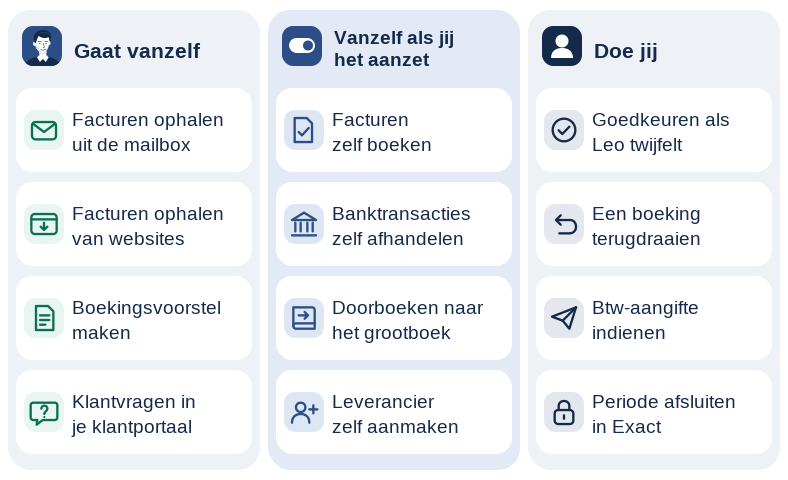
Leo keeps working, even when nobody at your firm logs in. He brings in the work himself and prepares it. Whatever he can't finish, he puts to you.
A day in Leo's work
| When | What Leo does |
|---|---|
| Straight away | Reads an invoice as soon as it arrives in his mailbox or the client portal |
| Every hour, or as you choose | Checks an existing mailbox you have connected |
| Once a week | Fetches invoices from the websites of suppliers you have added. Read How invoices reach Leo |
| At night | Checks again every invoice that is waiting for you. If a question is no longer needed, he removes it |
| 06:30 | Asks clients with a client portal for the receipt for a payment that has no receipt yet |
| 07:00, 10:00, 13:00, 16:00 and 19:00 | Fetches new bank transactions from Exact Online |
| Every minute | Adds a suggestion to new bank transactions, and sends bank transactions that someone at your firm approved on to Exact Online |
All times are Dutch time.
For each invoice, Leo prepares a booking according to your working agreements. He rejects some documents himself: a duplicate invoice, a proof of payment, or a document that isn't an invoice. He also rejects an invoice addressed to a different company or person when you rejected or deleted the previous two from that supplier addressed to that name. He moves an invoice meant for another administration of your firm to that administration. If exactly one payment fits an invoice he processed, he matches the two in boeq himself. That only reaches Exact Online after your approval, or once he has the authorisation to post it.
If you make the same correction a few times for the same supplier, Leo turns it into a working agreement himself. It applies straight away and you get a notification about it.
What Leo only does once you switch it on
- Booking in Exact Online on his own: by default, Leo books nothing without your approval. An Administrator, or someone with the Manage working agreements permission, can give him the authorisation, per administration and with a threshold. Read Leo's authorisations: booking on his own and thresholds.
- Creating an unknown supplier himself: read Set up Leo's way of working.
- Asking your client directly: this works once the administration has a client portal. Leo then puts some questions in the portal himself. Read Create a client portal and invite your client.
How to build this up step by step is in Let Leo do more.
What you always do yourself
- Revert a booking.
- Give and take back Leo's authorisations.
- Accept a proposal for a working agreement.
- Choose when a payment fits more than one invoice, or judge a difference that no working agreement covers.
- The VAT return, and closing a period in Exact Online.
What your client notices
Leo doesn't email your client. If your client has a client portal, Leo puts questions there himself, such as a request for a receipt or for an explanation of an invoice. Your client sees them under To do after logging in. Without a client portal, most of those questions come to you, under Questions. Read Answer questions and pass them on to your client.
See what Leo did
-
Dashboard: on The floor you find Leo's last 24 hours.
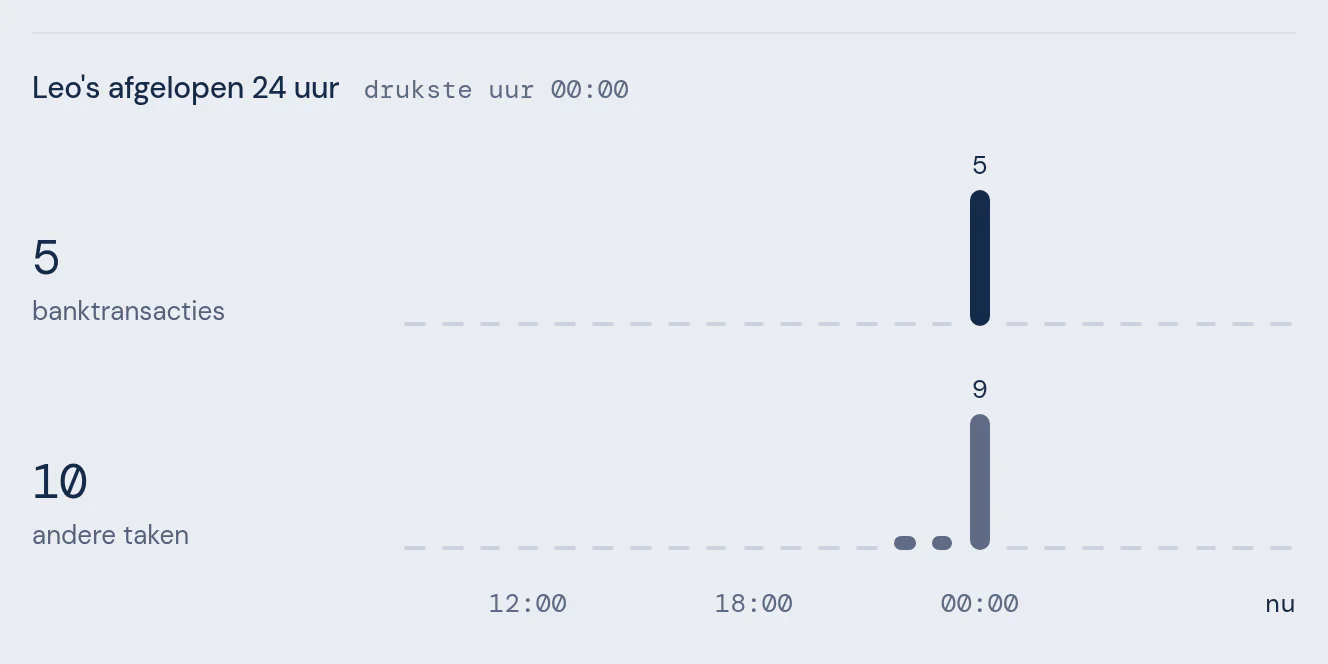
For each hour you see how many bank transactions and other tasks Leo picked up. -
Leo's record: open Dossier and under Period choose 7 days. What Leo has done shows how much Leo finished without your help, and Why work came back to you shows what came back to you. Read Leo's record.
-
Activity: for each invoice and bank transaction you see what Leo did, with his name next to it. On a bank transaction Leo also says which step decided the line, and why he booked it or put it to you.
-
Notifications: when invoices are waiting for you, you get the Manual invoice overview once a day, by default under the bell. You switch on email yourself. Read Your profile, language and notifications.
What Leo does
Leo fetches invoices and bank transactions, prepares the booking, rejects duplicate documents and checks every night what is still open.
What you decide
You decide whether Leo also books on his own, for which administrations and at which threshold. Reverting is always done by a person.
Further reading
Still stuck? Email [email protected] or call +31 6 57867535.