Topics
Start your first closing
Start a client's first closing yourself, in Closings or on the administration's page. After that, Sara plans the rest.
-
 Sara
- Updated
- 3 min read
- Role: Member or Administrator
Before you start
- Sara is switched on for your firm.
- You have the Prepare closings permission.
- The administration is connected to Exact Online.
Screenshots show boeq's Dutch interface.
Sara starts on a client as soon as you enrol the administration with her. Usually you do that by starting the first closing. After that, Sara plans every next period herself.
Start a closing
-
Open Closings in the menu.
-
At the top, under Administration, choose the client. Type part of the name to search.
-
Under Period, choose the period. The list holds the closings the administration already has, with their status. Below them are the past months, quarters and fiscal years without a closing. The newest is at the top.
-
Click Start closing.
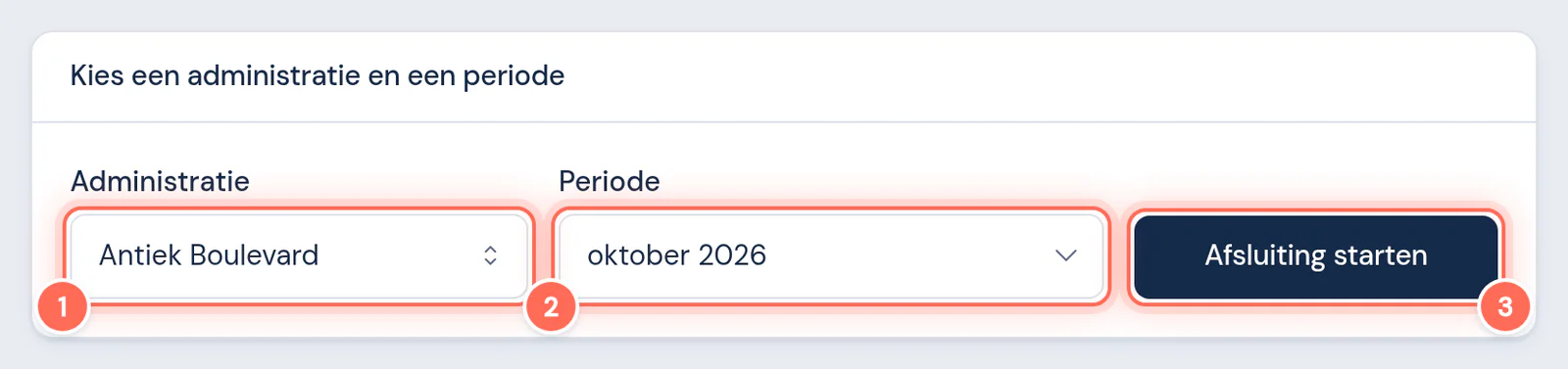
Choose the administration (1) and the period (2). Then click Start closing (3).
The closing starts and opens straight away. If the period already has a closing, the button says Open closing.
You start one administration at a time, and only a period that has ended. You can't plan a running period here. Without the Prepare closings permission, the list only shows the closings that already exist.
Good to know
The type you start the first time becomes the client's cadence. If you start a monthly closing, Sara prepares a closing for this client every month from then on. A year-end closing doesn't count here: the client then gets the cadence Sara proposes. If you choose a cadence under Confirm profile for a client that isn't enrolled yet, that enrols the client too. Read Month, quarter and year: the types of closing.
Start from the administration's page
The administration's page has the Start a closing card. You open that page from a closing of the client: click the arrow next to the name of the administration.
-
Under Kind, choose Month, Quarter or Year. Kind is set to Year at first. For a first closing, choose the type the client should get.
-
Under Period, choose the period. You only see past periods that don't have a closing yet.
-
Click Start.
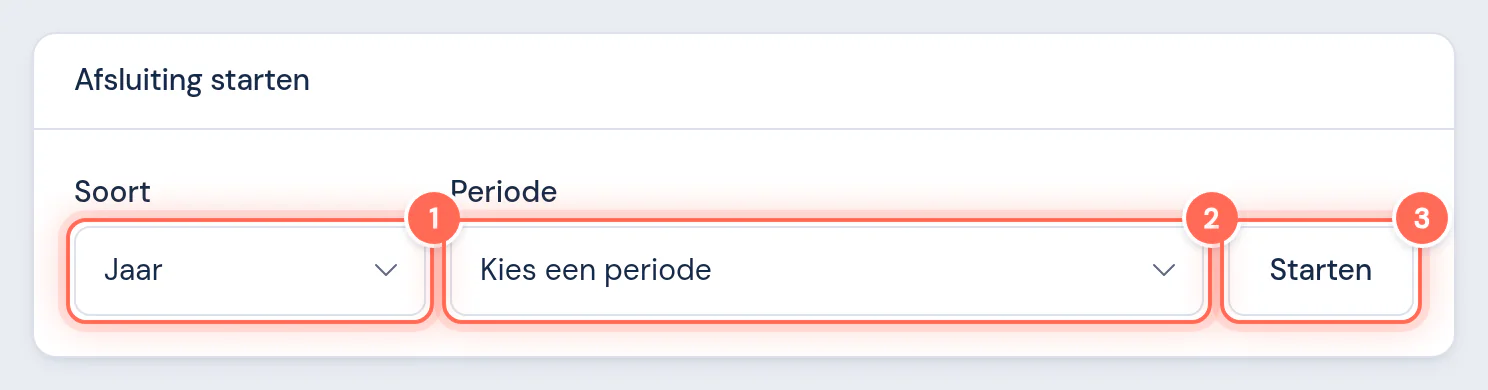
Choose the kind (1) and the period (2). Then click Start (3).
What happens next
The closing gets the status Planned. After that you see Collecting data and Preparing. In Closings it is then listed under Sara is working, with what Sara is doing. Does Sara need documents from the client? Then the closing is Waiting on documents. Read Send client questions and the document list.
Once the checks are done, the closing is set to To review. Sara then still writes her explanations and assessments. Once she is done, and at most 6 hours after To review, everyone who may review closings gets a notification. If you chose a reviewer in the header of the closing, only that person gets the notification.
If it says Data blocked, read A closing does not start: how to fix it.
Continue with Review a closing: checks and verdicts.
What Sara does
Sara fetches the data, runs the checks and prepares the closing for you. After the first closing she plans every next period herself.
What you decide
You choose for which client and which period Sara prepares a closing, and how often.
Not working?
Further reading
Still stuck? Email [email protected] or call +31 6 57867535.