Topics
Reopen a closed period
Does something need to change after locking? Reopen the closing with a reason. This is how you do it, and what happens next.
- Level: Advanced
-
 Sara
- Updated
- 2 min read
- Role: Administrator, or a role with Reopen closings
Before you start
- The closing is Closed.
- You have the Reopen closings permission. Administrator has it.
Screenshots show boeq's Dutch interface.
A closed period is final. Leo no longer books anything in that period without you. If something still needs to change, you reopen the closing.
When you reopen
- You get the notification Locked closing changed. The general ledger of the period changed after it was locked.
- An invoice or bank transaction dated in the period still needs to be booked.
- You find a mistake in the period yourself.
Reopen the closing
-
Open the locked closing.
-
At the top right, click More and choose Reopen. A bar appears below the header.
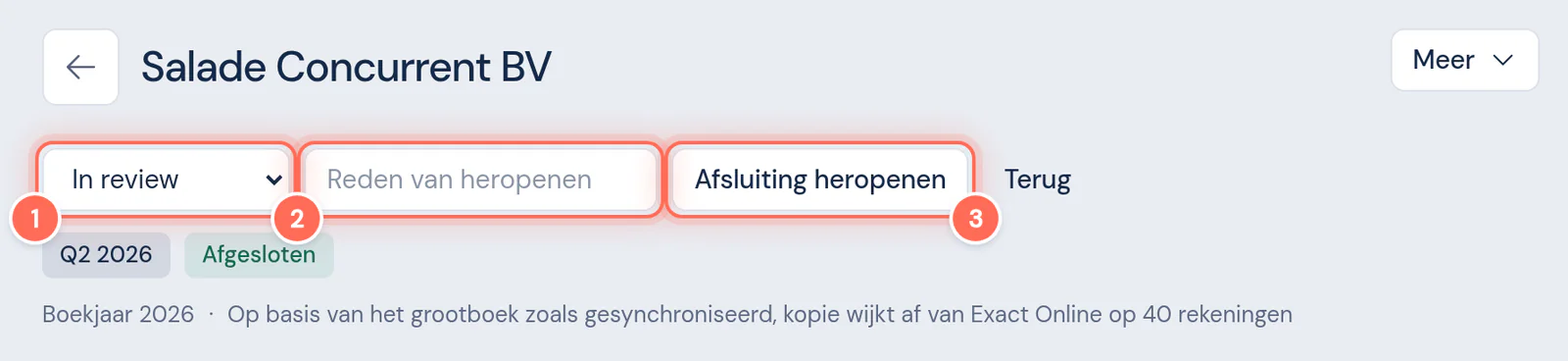
Choose where the closing goes back to (1), type a reason (2) and click Reopen closing (3). -
In the dropdown, choose In review or Preparing.
-
Under Reason for reopening, type why you are reopening.
-
Click Reopen closing.
In review or Preparing
| Choice | What happens | When to choose it |
|---|---|---|
| In review | The closing goes back to In review. Sara's outcomes stay as they are. | You want to change a verdict or review something again. |
| Preparing | Sara prepares the closing again, on a new copy of the general ledger. | The general ledger of the period has changed. |
What happens next
- Leo no longer holds new bookings in the period. Invoices he held earlier are still waiting for you under Leo needs you.
- Is a later closing of this client open? Some of its outcomes become out of date. Click More › Refresh data there.
- When you are done, you approve the closing again and lock it again. boeq then stores a new version of the closing file. The old version is kept.
Watch out
Reopening in boeq doesn't open the period in Exact Online. If you need to book in Exact Online, reopen the period there too. Close it again afterwards.
What Sara does
If you choose Preparing, Sara prepares the closing again on a new copy of the general ledger.
What you decide
Only a person reopens. Sara never reopens a period, not in boeq and not in Exact Online.
Further reading
Still stuck? Email [email protected] or call +31 6 57867535.